
Zoom Phone vs VoIP: Which Business Calling Option Is Better?
Choosing a business phone system can feel confusing when every option promises clear calls and easy management. If you are comparing Zoom Phone vs VoIP, you are really asking whether a ready made cloud phone service suits your team better than a broader, more flexible internet calling setup.
The two are closely related, which is why they are often mixed up. Zoom Phone is one specific product that runs on VoIP technology. VoIP is the underlying method that many phone services use.
This guide breaks down the real differences so you can decide with confidence.
What Is VoIP?
VoIP stands for Voice over Internet Protocol. It converts your voice into digital data and sends it over the internet instead of traditional phone lines.
That simple idea powers a wide range of tools. Some are basic calling apps. Others are complete business phone systems with call routing, voicemail, and reporting.
VoIP can be delivered in several ways. A business can use a hosted service from a provider, run its own system on site, or mix both approaches. This variety is the main reason VoIP feels so flexible.
What Is Zoom Phone?
Zoom Phone is a cloud based phone system built by Zoom. It uses VoIP to place and receive calls, but it comes as a complete package that is managed through one platform.
Users can make calls from a desktop app, a mobile app, or a compatible desk phone. Admins manage everything from a single web portal.
Because it lives inside the Zoom ecosystem, it connects naturally with video meetings, team chat, and other Zoom tools your team may already use.
Zoom Phone vs VoIP: The Key Differences
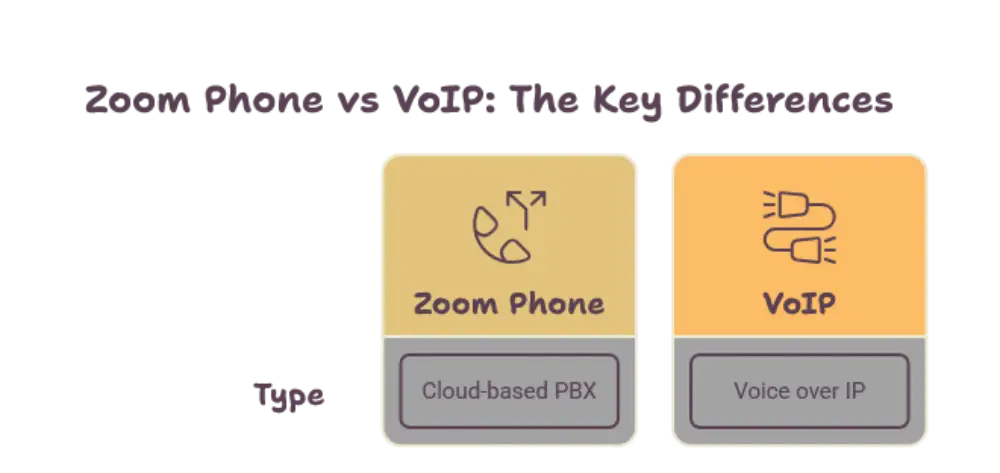
The easiest way to understand Zoom Phone vs VoIP is to remember this. Zoom Phone is a specific service, while VoIP is the technology category it belongs to.
Here is how they compare in the areas that matter most.
Setup and Deployment
Zoom Phone is designed for quick setup. You assign numbers, add users, and configure call settings through one dashboard. There is little hardware to worry about.
General VoIP setups vary a lot. A hosted VoIP service can be simple to launch. A self managed system may need servers, special equipment, and technical skills.
If you want speed and simplicity, Zoom Phone has a clear edge. If you want full control over every piece, a broader VoIP approach can offer more room.
Features and Call Handling
Zoom Phone includes the features most businesses expect. These include voicemail, call queues, auto receptionists, call forwarding, call recording, and caller ID.
General VoIP systems can include the same features, but the exact list depends on the provider or the software you choose. Some offer basic calling only. Others offer advanced tools for contact centers and complex call flows.
The takeaway is simple. Zoom Phone gives you a consistent, known feature set. VoIP in general gives you a wide range that you must evaluate case by case.
Integration with Video and Collaboration
This is where Zoom Phone stands out. You can move from a phone call to a video meeting in a few clicks. Calls, chat, and meetings all live in the same app.
With a general VoIP system, integration depends on what you connect. Many VoIP tools can link with business apps, but each connection may need extra setup and testing.
Teams that already hold regular video meetings often find the unified experience easier to adopt.
Customization and Flexibility
General VoIP wins on flexibility. You can choose your own hardware, pick a provider that fits a niche need, or build a custom setup around unusual workflows.
Zoom Phone offers a solid range of settings, but it works within the boundaries of the Zoom platform. That structure keeps things simple, though it may feel limiting for businesses with very specific requirements.
Management and Support
Zoom Phone gives admins one portal to manage users, numbers, policies, and analytics. Updates happen automatically in the cloud, so your team does not need to handle upgrades.
With a general VoIP setup, management depends on the provider or on your own team. A hosted VoIP service can be just as easy to manage. A self hosted system places more responsibility on your IT staff.
Benefits of Zoom Phone
Zoom Phone suits businesses that want a clean, connected experience. Here are the main strengths.
It offers a familiar interface for anyone who already uses Zoom. Training time is short, and adoption tends to be smooth.
It combines calling, meetings, and chat in one place. This reduces app switching and keeps conversations organized.
It runs in the cloud, which means remote and hybrid teams can work from almost anywhere with a stable internet connection.
It handles updates and maintenance behind the scenes, which frees your team to focus on actual work.
Benefits of General VoIP
A broader VoIP approach is attractive when you need freedom and control.
You can choose from many providers and tools, which lets you match the system to your exact needs.
You can use existing hardware in some cases, and you can design custom call flows for complex operations.
You can scale in a way that fits your own technical plans, especially if you have an in house IT team that enjoys fine tuning the system.
For businesses with unique requirements, this flexibility can matter more than convenience.
Call Quality and Reliability
Both options depend on a strong internet connection. Call quality is mostly shaped by your network, not by the label on the service.
Zoom Phone is built on a global cloud infrastructure and includes tools that help keep calls stable. Good VoIP providers also invest heavily in reliability and offer features like automatic failover.
Whichever route you take, test your network first. A stable connection, a good router, and quality headsets make a bigger difference than most people expect.
Security Considerations
Security matters for any system that carries business conversations. Zoom Phone includes encryption options and admin controls that help protect calls and data.
General VoIP security depends on the provider or on how well you configure your own system. A well managed VoIP setup can be very secure. A poorly managed one can create risks.
Whichever you choose, ask about encryption, access controls, and how updates are delivered.
Which One Is Right for Your Business?
The best choice depends on how your team works and how much control you want.
Choose Zoom Phone If
Your team already relies on Zoom for meetings and chat. You want a simple, all in one platform. You prefer fast setup and easy administration. You have limited IT resources and want the provider to handle the technical side.
Choose a General VoIP Setup If
You need a highly customized system. You want to select hardware and software separately. You have an IT team that can manage a more hands on solution. You have specialized call handling needs that a packaged product may not cover.
Many small and mid sized teams find that Zoom Phone covers their daily needs with less effort. Larger or more specialized operations may lean toward a broader VoIP design.
Conclusion
The question of Zoom Phone vs VoIP is not really about picking a winner. Zoom Phone is one polished example of VoIP, delivered as a unified cloud service. General VoIP is the wider category, offering more choice and more control.
If you value simplicity, strong video integration, and easy management, Zoom Phone is a great fit. If you need deep customization and flexibility, a broader VoIP approach may serve you better.
Start by listing your team’s daily needs, test your internet connection, and try a trial or demo before you commit. That small effort will help you choose a system your team actually enjoys using.
Frequently Asked Questions
Is Zoom Phone a VoIP service?
Yes. Zoom Phone uses VoIP technology to send voice calls over the internet. It is a packaged cloud phone service built on that technology.
What is the main difference between Zoom Phone and VoIP?
Zoom Phone is a specific product from Zoom, while VoIP is the general technology used by many phone systems. VoIP offers more variety, while Zoom Phone offers a unified, ready to use experience.
Can I use Zoom Phone on my mobile device?
Yes. Zoom Phone works through desktop and mobile apps, so you can make and receive business calls from your phone or computer with an internet connection.
Do I need special hardware for Zoom Phone?
Not necessarily. You can use the Zoom app with a headset, or you can use compatible desk phones if your team prefers a traditional feel.
Is VoIP reliable enough for business calls?
Yes, when paired with a stable internet connection and a reputable provider. Good network setup, quality equipment, and features like failover help keep calls clear and consistent.













Post Comment