
Business Phone System Features Every Company Should Know About
A modern business phone system offers far more than simple calling. Today’s systems combine voice, messaging, and collaboration tools into one platform that helps teams stay connected and productive. Understanding business phone system features helps you choose a solution that fits your daily operations and supports long term growth.
In this guide, we will explore the most valuable features found in modern business phone systems and explain how each one supports smoother communication across your organization.
Why Business Phone System Features Matter
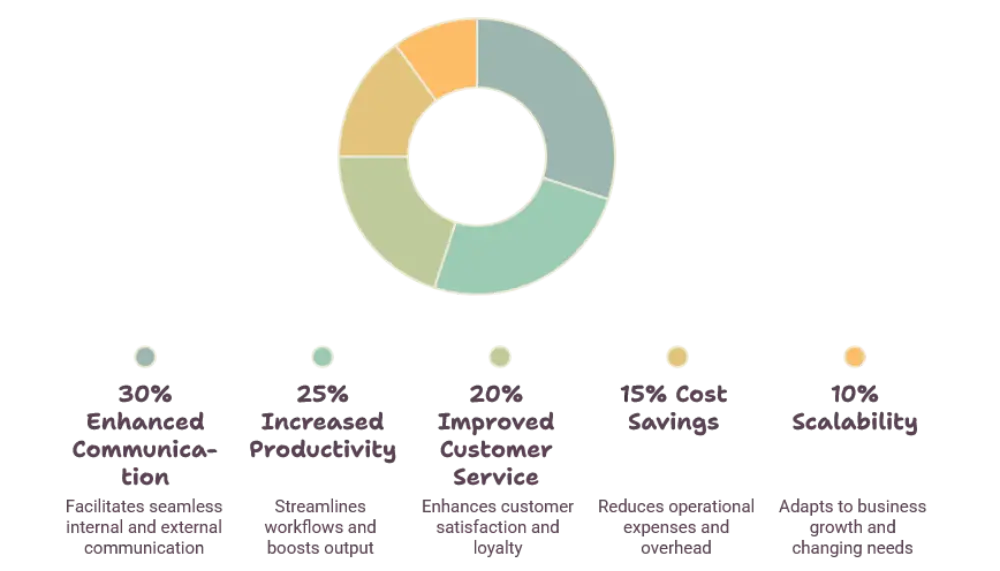
Communication is the backbone of every organization. When your phone system lacks the right tools, calls get missed, customers get frustrated, and teams lose valuable time.
A well designed phone system brings structure to daily communication. It ensures calls reach the right person, conversations are tracked properly, and remote teams stay just as connected as those in the office.
Improved Customer Experience
Customers expect quick and clear communication. Features like call routing and voicemail transcription help your team respond faster and reduce wait times.
Better Team Collaboration
Employees often need to communicate internally before speaking with a customer. Built in messaging and conferencing tools make internal collaboration seamless.
Core Business Phone System Features
Let’s look at some of the essential features that make a business phone system effective for daily operations.
Auto Attendant
An auto attendant greets callers automatically and directs them to the correct department or extension. This feature removes the need for a dedicated receptionist and ensures every call is handled professionally, even outside office hours.
Call Routing and Forwarding
Call routing ensures incoming calls reach the right team member based on department, availability, or time of day. Call forwarding allows employees to receive calls on their mobile devices when they are away from their desks.
Voicemail to Email and Transcription
Voicemail messages can automatically be transcribed into text and sent directly to email. This allows employees to quickly scan messages without needing to listen to every recording.
Call Recording
Call recording helps businesses maintain quality standards, train new employees, and resolve disputes. Recorded calls can also support compliance requirements in regulated industries.
Conference Calling
Conference calling allows multiple participants to join a single call, making it easier to coordinate meetings with clients, vendors, or remote employees.
Mobile App Integration
A mobile app extension lets employees make and receive business calls from their smartphones. This feature is especially valuable for hybrid and remote teams that need flexibility.
Video Conferencing
Many modern phone systems combine voice calling with video meetings, screen sharing, and virtual whiteboards. This unifies communication tools into a single platform instead of relying on separate applications.
Advanced Business Phone System Features
Beyond the essentials, several advanced features can further improve communication efficiency and customer satisfaction.
Interactive Voice Response (IVR)
IVR systems allow callers to navigate menus using voice commands or keypad selections. This reduces the workload on staff while providing customers with self service options.
Call Analytics and Reporting
Analytics dashboards track call volume, average handling time, and missed calls. These insights help managers identify bottlenecks and improve team performance.
CRM Integration
Integrating your phone system with a CRM platform gives employees instant access to caller history and account details. This creates more personalized and efficient customer interactions.
Team Messaging
Built in chat tools allow employees to send quick messages, share files, and collaborate without switching to a separate messaging app.
Call Queuing
Call queuing organizes incoming calls during high volume periods, ensuring customers are placed in an orderly line instead of receiving busy signals.
Custom Greetings and Hold Music
Custom greetings and hold music create a professional impression and help reinforce your brand identity during every customer interaction.
Multi Device Ringing
This feature allows a single business number to ring across multiple devices at once, including desk phones, laptops, and mobile phones, so no call goes unanswered.
How to Choose the Right Features for Your Business
Every organization has different communication needs. A small team may prioritize mobile app integration and voicemail transcription, while a larger organization might focus more on call analytics and CRM integration.
Start by reviewing your daily communication challenges. Identify where calls are being missed, where customer service could improve, and where your team needs better collaboration tools. This approach helps you match business phone system features to real operational needs rather than choosing based on trends alone.
Conclusion
Choosing the right business phone system features can transform how your company communicates internally and with customers. From auto attendants and call routing to video conferencing and CRM integration, each feature plays a role in creating a more efficient and professional communication experience.
By understanding these features and matching them to your business needs, you can build a communication system that supports growth, improves customer satisfaction, and keeps your team connected no matter where they work.
Frequently Asked Questions
What is the most important feature in a business phone system?
Call routing is often considered essential since it ensures every call reaches the right person or department without delay.
Can a business phone system work with remote teams?
Yes, features like mobile app integration and multi device ringing allow remote employees to stay connected just like in office staff.
Does a business phone system support video calls?
Many modern systems include built in video conferencing along with traditional voice calling, combining both tools into one platform.
How does call analytics help a business?
Call analytics provides insights into call volume and handling time, helping managers identify trends and improve overall team performance.
Is CRM integration necessary for small businesses?
While not required, CRM integration can help small businesses offer more personalized service by giving employees quick access to customer history.














Post Comment