
UCaaS Explained: A Complete Guide to Unified Communications as a Service
UCaaS explained simply means moving all your business communication tools calling, video meetings, messaging, and collaboration into one cloud based platform. Instead of juggling separate systems for phone calls, chat apps, and video conferencing, UCaaS brings everything under a single login and a single provider. For growing businesses that need flexibility and simplicity, understanding UCaaS is the first step toward smarter communication.
What Is UCaaS
UCaaS stands for Unified Communications as a Service. It is a cloud delivery model that combines multiple communication channels such as voice calling, video conferencing, instant messaging, file sharing, and team collaboration into one unified platform hosted and maintained by a third party provider.
Rather than installing hardware or maintaining an onsite phone system, businesses access everything through the internet. This makes UCaaS especially appealing to remote teams, hybrid workplaces, and organizations that want to reduce the complexity of managing multiple disconnected tools.
How UCaaS Works
UCaaS operates through cloud servers managed by the service provider. Employees connect using an app on their computer, smartphone, or desk phone. All calls, messages, and meetings are routed through the internet using technology such as VoIP (Voice over Internet Protocol).
Because everything lives in the cloud, updates, security patches, and new features are rolled out automatically. There is no need for businesses to manage physical servers or worry about outdated software.
Core Features of UCaaS
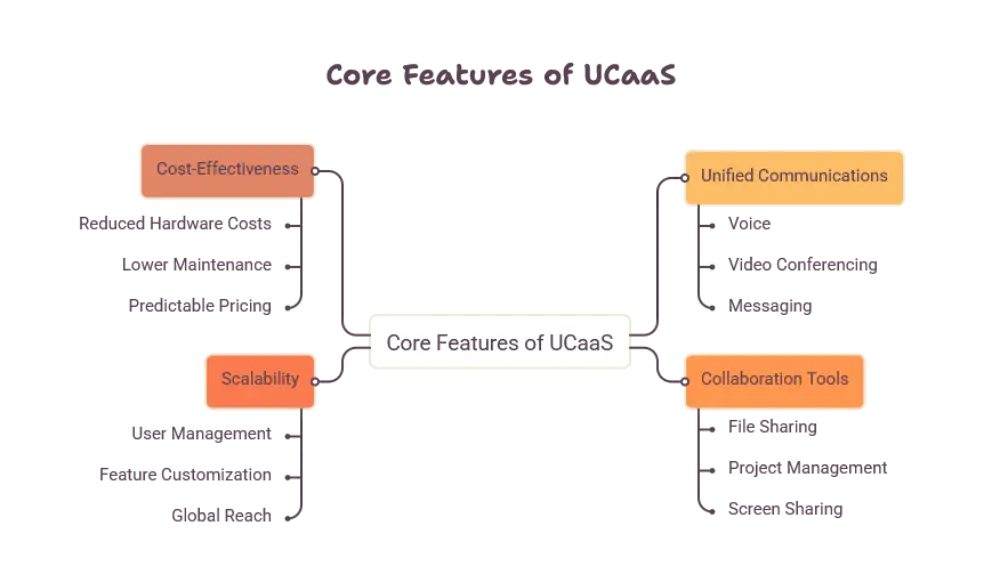
UCaaS platforms typically bundle several communication tools together. While offerings vary by provider, most solutions include the following core capabilities.
Voice Calling
Cloud based phone systems allow employees to make and receive calls from anywhere using an internet connection instead of traditional phone lines.
Video Conferencing
Built in video meeting tools let teams host virtual meetings, webinars, and screen sharing sessions without needing a separate video app.
Team Messaging
Instant messaging and chat channels help teams communicate quickly, share files, and stay connected in real time.
Presence and Status Updates
Presence indicators show whether a team member is available, busy, or away, helping coworkers know the best way to reach them.
Integration with Business Tools
Many UCaaS platforms integrate with customer relationship management software, email, calendars, and productivity apps, allowing teams to work without switching between multiple tools constantly.
Why Businesses Are Moving to UCaaS
Communication needs have changed dramatically as remote and hybrid work becomes the norm. UCaaS addresses many of the pain points businesses face with traditional communication systems.
Simplified Communication
Instead of managing separate vendors for phone service, video calls, and messaging, businesses get one unified system that works together seamlessly.
Support for Remote and Hybrid Teams
Employees can stay connected whether they are working from an office, home, or traveling, since UCaaS only requires an internet connection to function.
Scalability
As a business grows or shrinks, UCaaS platforms make it easy to add or remove users without needing new hardware or complex installations.
Improved Collaboration
With voice, video, and messaging in one place, teams spend less time switching between apps and more time getting work done.
Business Continuity
Because UCaaS is cloud based, communication does not stop during office closures, natural events, or equipment failures. Employees can simply log in from another location and continue working.
UCaaS vs Traditional Communication Systems
Traditional business phone systems rely on physical hardware installed onsite, such as PBX equipment and wired phone lines. These systems often require dedicated IT support and are difficult to scale.
UCaaS eliminates the need for onsite equipment by hosting everything in the cloud. This shift allows businesses to focus less on maintaining infrastructure and more on using communication tools effectively.
Another key difference is flexibility. Traditional systems are often location bound, meaning employees can only use their business phone from the office. UCaaS allows employees to make and receive business calls from any device, anywhere.
Who Uses UCaaS
UCaaS is not limited to any single industry. It is widely used across many sectors including healthcare, retail, education, real estate, and professional services. Any organization that relies on communication for daily operations can benefit from a unified platform.
Small and Medium Businesses
Smaller organizations benefit from simplified setup and centralized management without needing a large IT department.
Enterprises
Larger organizations use UCaaS to standardize communication across multiple offices, departments, and countries.
Remote First Companies
Businesses with fully remote teams depend on UCaaS to maintain consistent communication regardless of employee location.
Security Considerations in UCaaS
Since UCaaS platforms handle sensitive business conversations and data, providers implement security measures such as encryption, secure login protocols, and compliance certifications. Businesses should ensure that any platform they use aligns with their industry’s data protection requirements, especially in fields like healthcare and finance.
Choosing the Right UCaaS Platform
When evaluating a UCaaS solution, businesses should think about their specific communication needs rather than choosing based on trends alone. Important factors include ease of use, reliability, available integrations, customer support quality, and how well the platform fits into existing workflows.
It is also helpful to consider how well the platform scales as the business grows, and whether it supports the devices and operating systems employees already use.
The Future of UCaaS
As artificial intelligence and automation continue to evolve, UCaaS platforms are increasingly incorporating smart features such as automated meeting transcripts, intelligent call routing, and virtual assistants. These advancements are making unified communication systems even more efficient and valuable for modern businesses.
The shift toward hybrid work is expected to continue, which means demand for flexible, cloud based communication tools like UCaaS will keep growing.
Conclusion
UCaaS explained in simple terms is really about convenience, flexibility, and unification. By combining calling, messaging, video conferencing, and collaboration tools into a single cloud based platform, businesses can simplify their communication systems while supporting remote and hybrid work environments. As technology continues to advance, UCaaS is likely to become an even more essential part of how businesses communicate and collaborate.
Frequently Asked Questions
What does UCaaS stand for?
UCaaS stands for Unified Communications as a Service, a cloud based platform that combines calling, messaging, and video conferencing into one system.
Is UCaaS the same as VoIP?
No. VoIP refers specifically to voice calls made over the internet, while UCaaS includes VoIP along with messaging, video conferencing, and other collaboration tools.
Can small businesses use UCaaS?
Yes. UCaaS is designed to be flexible and scalable, making it suitable for small businesses as well as large enterprises.
Do employees need special hardware to use UCaaS?
Not necessarily. Most UCaaS platforms work through apps on computers, smartphones, or tablets, though some businesses choose to use compatible desk phones as well.
Is UCaaS secure for business communication?
Reputable UCaaS providers use encryption and follow industry security standards to protect business conversations and data.














Post Comment