
Secure Business VoIP Setup: A Complete Guide
You’re running a business, and you know that communication is the lifeblood of your operations. Yet, the thought of setting up a new Voice over Internet Protocol (VoIP) system might feel daunting. You envision tangled wires, complex configurations, and endless troubleshooting. But what if you could have a secure, reliable, and cost-effective communication system that empowers your team and impresses your clients? That’s where a secure business VoIP setup comes in, and this guide is designed to walk you through every step. You’ll learn not just how to set it up, but why each security measure is crucial, turning a potentially stressful process into a confident investment in your business’s future.
Understanding the Fundamentals of Business VoIP
Before you dive into the intricacies of security, it’s essential to grasp the core concepts of business VoIP. You’ll be surprised at how these fundamental building blocks lay the groundwork for a robust and protected system.
What Exactly is Business VoIP?
You might be familiar with residential VoIP services, but business VoIP is specifically tailored to the demands of a commercial environment. It leverages your existing internet connection to transmit voice calls digitally. Instead of relying on traditional phone lines, your calls travel as data packets over the internet. This offers a host of advantages, including lower call costs, enhanced features, and greater flexibility. You’re not just buying a phone service; you’re investing in a platform that can integrate with your workflow.
The Shift from Traditional PBX to Cloud-Based VoIP
Think back to the days of on-premise Private Branch Exchanges (PBXs). These were large, complex machines that required significant hardware, physical space, and dedicated IT staff to manage. Cloud-based VoIP has largely rendered these obsolete. Your entire phone system now resides in a secure data center managed by your VoIP provider. This means you don’t have to worry about hardware maintenance, upgrades, or physical security. It’s a more scalable, agile, and often more cost-effective solution that allows you to focus on your business, not your phone system. You’re essentially outsourcing the heavy lifting of infrastructure management.
Key Features and Benefits for Your Business
Beyond just making and receiving calls, business VoIP platforms offer a suite of features designed to boost productivity and professionalism. As you explore these, keep an eye on how they can be integrated securely into your daily operations.
Unified Communications (UC) and Collaboration Tools
This is where VoIP truly shines. Unified Communications integrates various communication channels into a single interface. Think instant messaging, video conferencing, presence indicators (seeing if colleagues are available), and file sharing, all accessible from your desktop or mobile device. This seamless integration fosters collaboration and ensures that your team can connect and share information effortlessly, no matter where they are. You’re not just connecting voices; you’re connecting people and ideas.
Scalability and Flexibility for Growth
Your business is dynamic, and your communication system needs to be too. VoIP systems are incredibly scalable. Need to add a new employee or a new office? It’s as simple as adding a new user license or configuring a new location through your provider’s portal. You can scale up or down quickly without expensive hardware overhauls or complicated installations. This agility is critical in today’s fast-paced business landscape. You can adapt your communication infrastructure to match your evolving business needs.
Cost Savings and Predictable Expenses
Compared to traditional phone services, VoIP typically offers significant cost savings. You’ll likely see lower monthly line charges, reduced long-distance rates, and fewer hardware maintenance costs. Many providers offer bundled packages that simplify your billing and make expenses predictable. This financial advantage allows you to allocate more resources to other critical areas of your business. You’re making a smart financial decision that benefits your bottom line.
The Crucial Importance of VoIP Security
Now, let’s get to the heart of the matter: security. While the benefits of VoIP are undeniable, neglecting its security can expose your business to significant risks. You need to be proactive to protect your communication channels and sensitive data.
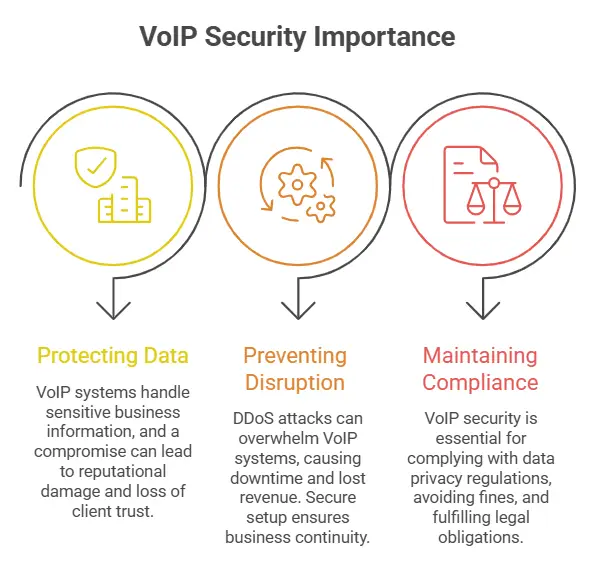
Why is VoIP Security So Important for Your Business?
You might think that phone calls are less sensitive than, say, financial transactions, but in a business context, they can carry a wealth of critical information. Data breaches, eavesdropping, and service disruptions can have severe consequences.
Protecting Sensitive Business Data and Conversations
Your VoIP system handles internal discussions, client negotiations, and potentially even sensitive customer information. A compromised VoIP system could lead to the interception of these critical conversations, exposing trade secrets, client lists, or personal data. This can result in reputational damage, loss of client trust, and even legal liabilities. You’re guarding the very essence of your business dealings.
Preventing Service Disruption and Downtime
A common attack vector for VoIP is a Distributed Denial of Service (DDoS) attack, which can overwhelm your system and render it unusable. Imagine your sales team being unable to make calls during a critical promotion, or your customer support being completely shut down. This downtime translates directly into lost revenue and frustrated customers. Secure setup ensures your business can continue to operate without interruption. You’re ensuring business continuity.
Maintaining Regulatory Compliance
Depending on your industry, you may be subject to various regulations regarding data privacy and communication security (e.g., HIPAA, GDPR). A secure VoIP setup is essential for demonstrating compliance and avoiding hefty fines. You’re not just protecting your business; you’re fulfilling your legal obligations.
Common VoIP Security Threats You Need to Be Aware Of
Understanding the enemy is the first step in defeating them. These are the common threats that can target your VoIP system.
Eavesdropping and Call Interception
Without proper encryption, your calls can potentially be intercepted by malicious actors. This is akin to someone listening in on your private conversations. You need to ensure that your communication remains confidential.
Toll Fraud and Unauthorized Usage
This occurs when attackers gain access to your VoIP system and use it to make unauthorized, often expensive, calls. This can lead to massive unexpected bills and fraudulent charges. You’re preventing someone from stealing your phone service.
Voice Spam and Phishing Attacks
Just like email spam, VoIP can be a target for malicious actors attempting to trick your employees into revealing sensitive information or downloading malware. These attacks can be subtle and insidious.
Denial of Service (DoS) and Distributed Denial of Service (DDoS) Attacks
Now that you understand the threats, it’s time to fortify your defenses. This section will detail the essential security measures you need to put in place.
Encrypting Your Communications
Encryption is your primary shield against eavesdropping. You need to ensure that the data transmitted over your VoIP system is scrambled and unreadable to anyone without the decryption key.
Transport Layer Security (TLS) for Signaling and SRTP for Media
These are the industry-standard protocols for securing VoIP. TLS encrypts the signaling data (the setup and control of your calls), while Secure Real-time Transport Protocol (SRTP) encrypts the actual voice data. Ensure your VoIP provider supports and enables these. You’re making your conversations unintelligible to unauthorized listeners.
End-to-End Encryption Options
For the highest level of security, explore whether your provider offers end-to-end encryption. This means the communication is encrypted from the originating device to the receiving device, with no point in between where it can be decrypted. This is particularly important if you handle highly sensitive information. You’re creating an impenetrable bubble around your conversations.
Securing Your Network Infrastructure
Your VoIP system relies on your network. A weak network is a weak VoIP system.
Firewall Configuration and Management
Your firewall is the gatekeeper to your network. You need to configure it to allow legitimate VoIP traffic while blocking unauthorized access. This involves opening specific ports required for VoIP but carefully restricting any other inbound or outbound traffic. You’re building a strong wall around your digital assets.
Virtual Private Networks (VPNs) for Remote Access
If your employees work remotely or you have multiple office locations, using a VPN to connect them to your VoIP system adds a crucial layer of security. A VPN creates an encrypted tunnel over the public internet, making it appear as though your remote users are on your local network. You’re creating a secure private road for your data.
Network Segmentation
Consider segmenting your network so that your VoIP traffic runs on a separate subnet from other business data. This way, if one part of your network is compromised, the VoIP system remains isolated and protected. You’re creating separate, secure zones within your network.
User Authentication and Access Control
Who has access to your VoIP system and what can they do? Strong authentication and granular access control are vital.
Strong Passwords and Multi-Factor Authentication (MFA)
This is a fundamental security practice. Mandate strong, unique passwords for all VoIP accounts and, critically, implement Multi-Factor Authentication. MFA requires users to provide two or more verification factors to gain access, such as a password and a code from a mobile app. You’re making it incredibly difficult for unauthorized individuals to log in.
Role-Based Access Control (RBAC)
Grant users only the minimum permissions they need to perform their jobs. For example, an end-user shouldn’t have administrative control over the entire phone system. RBAC ensures that users can’t access or modify settings they’re not authorized for. You’re giving people exactly what they need and nothing more.
Regular Auditing of User Accounts
Periodically review your user accounts. Remove accounts for employees who have left the company immediately. You should also audit privileges to ensure they haven’t been unnecessarily escalated. You’re keeping your user roster clean and secure.
Choosing and Configuring Your VoIP Provider Securely
Your choice of VoIP provider significantly impacts your security. You need to partner with a provider that prioritizes security and understand how to configure their service correctly.
Vendor Selection: Prioritizing Security Features
When you’re evaluating potential VoIP providers, don’t just look at price and features; security should be at the forefront of your decision-making process.
Due Diligence: Provider’s Security Policies and Certifications
Ask potential providers about their security protocols, data handling practices, and any relevant certifications (e.g., ISO 27001). Look for providers who are transparent about their security measures. You’re entrusting your communications to them; they need to earn that trust.
Infrastructure Security: Data Centers and Redundancy
Inquire about the security of their data centers. What physical and cybersecurity measures do they have in place? Also, understand their disaster recovery and redundancy plans to ensure service continuity. You’re looking for a provider with a robust and resilient infrastructure.
Customer Support for Security Issues
Ensure your provider offers reliable customer support for security-related queries and incidents. You want to know you can get help quickly if a security concern arises.
Configuring Your VoIP System for Optimal Security
Once you’ve chosen a provider, the configuration is key.
Setting Up Your Auto-Attendant Securely
Your auto-attendant (IVR) can be a gateway. Ensure it doesn’t reveal too much information and has no easily guessable options. You’re designing your automated receptionist to be helpful but not vulnerable.
Managing Voicemail Security
Voicemail can be a weak point. Encourage users to set up PINs for voicemail access and consider options for encrypted voicemail delivery if available. You’re protecting your incoming messages.
Endpoint Device Security
The devices your employees use to make calls (desk phones, softphones on computers, mobile apps) are also potential vulnerabilities. Ensure these devices are kept up-to-date with the latest software and security patches. For computers and mobile devices, ensure they have strong passwords, antivirus software, and are protected by your network’s security measures. You’re securing the tools your employees use to communicate.
Ongoing Monitoring and Maintenance for Lasting Security
Security isn’t a one-time setup; it’s a continuous process. You need to stay vigilant to maintain a secure VoIP environment.
Regular Security Audits and Updates
Treat your VoIP system like any other critical IT infrastructure – it needs regular attention.
Software Updates and Patch Management
Ensure that all software related to your VoIP system, including firmware for desk phones, softphone applications, and any server-side components, is kept up-to-date with the latest security patches. Providers often release these to address newly discovered vulnerabilities. You’re plugging the security holes as they appear.
Security Audits and Vulnerability Scanning
Periodically conduct security audits of your VoIP system. This can involve internal reviews or engaging third-party security professionals to perform vulnerability scans and penetration testing. You’re proactively searching for weaknesses.
User Training and Awareness Programs
Your employees are often the first line of defense, but they can also be the weakest link if not properly trained.
Educating Your Team on VoIP Security Best Practices
Train your employees on the importance of strong passwords, recognizing phishing attempts, and the proper use of their VoIP devices. Regular refreshers are crucial. You’re empowering your team with the knowledge to be security-conscious.
Reporting Suspicious Activity
Establish a clear process for employees to report any suspicious activity they notice related to the VoIP system, such as unusual call logs, unexpected charges, or strange system behavior. Prompt reporting can help you detect and address threats early. You’re creating a culture of vigilance.
Incident Response Planning
Despite your best efforts, security incidents can still occur. Having a plan in place will allow you to respond effectively.
Developing an Incident Response Plan
Create a formal plan that outlines the steps to take in the event of a security breach or incident. This should include who to contact, how to contain the issue, and how to recover. You’re preparing for the worst-case scenario.
Practicing Your Incident Response Plan
Don’t just create the plan; test it. Conduct tabletop exercises or simulations to ensure your team knows how to execute the plan when needed. You’re honing your response to ensure effectiveness.
By following this comprehensive guide, you can move beyond the fear of complexity and confidently implement a secure business VoIP setup. You’re not just upgrading your phone system; you’re investing in the security, reliability, and future growth of your business. Take these steps, and you’ll enjoy the peace of mind that comes with knowing your communication channels are protected.
FAQs
What is VoIP and why is it important for businesses?
VoIP, or Voice over Internet Protocol, is a technology that allows users to make voice calls using a broadband internet connection instead of a regular (or analog) phone line. It is important for businesses because it offers cost savings, flexibility, and advanced features such as video conferencing and call routing.
What are the security risks associated with VoIP for businesses?
Some of the security risks associated with VoIP for businesses include eavesdropping, call tampering, denial of service attacks, and toll fraud. These risks can compromise the confidentiality, integrity, and availability of business communications.
What are some best practices for securing a business VoIP setup?
Some best practices for securing a business VoIP setup include using strong encryption for voice traffic, implementing access controls and authentication mechanisms, regularly updating and patching VoIP equipment and software, and monitoring for unusual call patterns or network activity.
What are some recommended security features for a business VoIP system?
Recommended security features for a business VoIP system include encryption for voice traffic, secure access controls, intrusion detection and prevention systems, firewalls, and regular security audits and assessments.
How can businesses ensure the security of their VoIP system while maintaining call quality and reliability?
Businesses can ensure the security of their VoIP system while maintaining call quality and reliability by implementing Quality of Service (QoS) mechanisms to prioritize voice traffic, using secure and reliable network infrastructure, and working with experienced VoIP service providers who prioritize security and performance.













Post Comment