
Remote Office Phone Systems: A Practical Guide for Modern Teams
Remote office phone systems have changed the way teams stay connected. Instead of relying on desk phones tied to one building, your business can run its entire calling setup over the internet. Employees answer calls from a laptop, a smartphone, or a desk phone at home, all under one company number.
This guide explains how these systems work, which features matter most, and how to set one up smoothly. Whether your team is fully remote or split between home and office, you will find practical advice here.
What Are Remote Office Phone Systems?
Remote office phone systems are business calling platforms that use an internet connection instead of traditional phone lines. Calls travel as data, so your team can make and receive them from nearly anywhere.
Most of these systems run in the cloud. That means the provider hosts the technology, and your team simply logs in through an app or a compatible phone.
The result is a single, unified phone network that treats every employee the same, no matter where they sit.
Why Businesses Are Moving to Remote Office Phone Systems
Work no longer happens in one place. Teams collaborate across cities, time zones, and home offices, and old phone setups struggle to keep up.
Remote office phone systems solve that problem in several ways.
Flexibility for Distributed Teams
Employees can take their business line wherever they go. A call to the main number can ring on a laptop at home, a phone in a coworking space, or a mobile device during travel.
This flexibility helps teams stay responsive without being chained to a desk.
A Consistent Customer Experience
Customers do not care where your team works. They only care that someone answers quickly and professionally.
With a unified system, every call shows the same business number and follows the same greeting and routing rules. Your company sounds polished and reliable at all times.
Easier Management
Traditional phone systems often need on site hardware and technician visits. Cloud based options move most of that work to a simple online dashboard.
Administrators can add users, change settings, and update call flows in minutes. There is no need to be in the office to make changes.
Key Features to Look For
Not every platform offers the same tools. When you review remote office phone systems, focus on features that support how your team actually works.
Call Routing and Auto Attendants
An auto attendant greets callers and guides them to the right person or department. Smart routing rules can send calls based on time of day, caller type, or team availability.
This keeps callers from getting lost and helps your staff handle the right conversations.
Mobile and Desktop Apps
A good app turns any device into a business phone. Employees can place calls, check voicemail, and view call history without sharing personal numbers.
Look for apps that are simple to use and work reliably on both phones and computers.
Voicemail to Email
Voicemail transcription and email delivery let your team read or listen to messages wherever they are. Nothing gets missed just because someone is away from their desk.
This feature is especially useful for people who split their day between meetings and calls.
Video and Messaging Integration
Many platforms combine voice, video, and chat in one place. Switching from a phone call to a video meeting takes a single click.
This reduces the need to juggle multiple tools and keeps conversations organized.
Analytics and Reporting
Call data reveals how your team performs. You can track call volume, wait times, missed calls, and busy periods.
These insights help managers adjust staffing and improve the caller experience over time.
How Remote Office Phone Systems Work
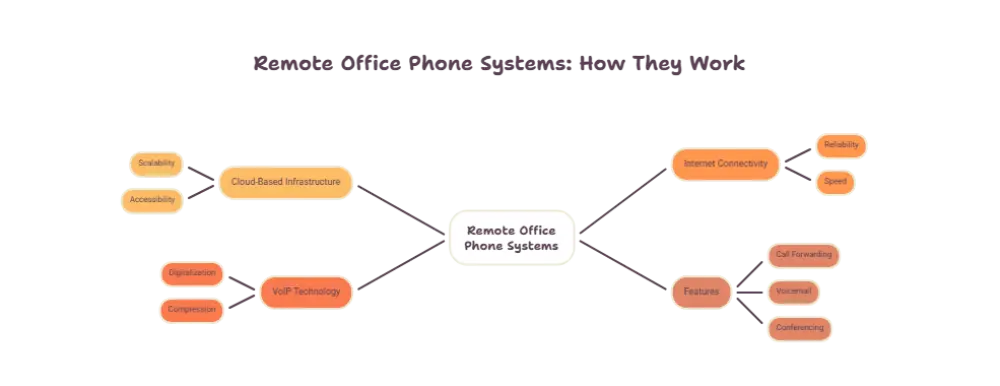
The technology behind these systems is easier to understand than it might seem.
When someone places a call, their voice is converted into digital data. That data travels across the internet to the provider, which then connects the call to its destination.
The same process works in reverse for incoming calls. Your business number is linked to the provider platform, which decides where to send each call based on your settings.
Because everything runs through software, changes happen quickly. A new hire can be added in a few minutes, and a departing employee can be removed just as fast.
What You Need to Get Started
The basic requirements are simple:
- A stable internet connection for each user
- A device such as a laptop, smartphone, or compatible desk phone
- A headset for clear audio during longer calls
- An account with a trusted provider
Most teams are ready to make calls within a short time after signing up.
Security Considerations
Security matters just as much for phone calls as it does for email or file storage. Business conversations often include sensitive details, so protection should be part of your decision.
Look for providers that offer encryption for calls and data. Strong password rules and multi factor login add another layer of safety.
Access controls are also helpful. They let you decide who can change settings, view reports, or manage users.
It also helps to train your team. Remind employees to use secure home networks, avoid public WiFi for important calls, and keep their apps updated.
Tips for a Smooth Setup
A little planning goes a long way when you introduce a new phone system.
Map Out Your Call Flows
Before setup, decide how calls should move through your business. Think about who answers the main line, how after hours calls are handled, and when calls should go to voicemail.
A clear plan prevents confusion later.
Test Your Internet Connection
Voice quality depends on a steady connection. Ask team members to check their home internet and, where possible, use a wired connection for important calls.
A quick test before launch can save plenty of frustration.
Train Your Team Early
Give employees time to explore the app and ask questions. Short guides or a brief training session help everyone feel confident from day one.
When people know how to transfer calls, set status, and check voicemail, the transition feels natural.
Start Small, Then Expand
If your business is large, consider rolling out the system to one team at a time. This lets you spot issues early and fix them before everyone is on board.
Common Mistakes to Avoid
Even strong platforms can disappoint when they are poorly planned. Watch out for these common errors.
- Skipping staff training and assuming everyone will figure it out
- Ignoring call quality testing before launch
- Failing to set clear routing rules for busy periods
- Overlooking security settings and user permissions
- Forgetting to update call greetings and business hours
Avoiding these mistakes helps your team get full value from the system from the very start.
Conclusion
Remote office phone systems give modern businesses the freedom to work from anywhere without losing the professional feel of a traditional phone line. They keep teams connected, customers happy, and management simple.
By choosing the right features, planning your call flows, protecting your data, and training your team, you can build a phone setup that supports growth and flexibility. As work continues to become more distributed, a reliable calling system is no longer a nice extra. It is a core part of how great teams communicate.
Frequently Asked Questions
What are remote office phone systems?
Remote office phone systems are internet based business phone platforms that let employees make and receive calls from any location. They use one company number and work on laptops, smartphones, and desk phones.
Do remote office phone systems need special equipment?
Not usually. Most teams only need a stable internet connection and a device such as a computer or smartphone. A headset is helpful for clearer audio, and some people prefer a compatible desk phone.
Can I keep my existing business phone number?
In most cases, yes. Many providers allow you to move your current number to the new platform, so customers can keep calling the same number they already know.
Are remote office phone systems secure?
Reputable providers use encryption, secure logins, and access controls to protect calls and data. Teams can add to this safety by using secure networks and keeping their apps updated.
Are remote office phone systems suitable for small businesses?
Yes. They work well for businesses of any size because they are easy to set up, simple to manage, and flexible enough to grow as your team expands.














Post Comment