The Best IP Phones for Clear, Reliable Business Communication
Finding the best IP phones is one of the smartest steps you can take to improve business communication. A good IP phone delivers clear calls, dependable performance, and features that make daily work easier.
But with so many models available, choosing the right one can feel confusing. This guide breaks down what matters most so you can decide with confidence.
What Are IP Phones?
IP phones, also called VoIP phones, make and receive calls over the internet instead of traditional phone lines. They connect to your network through an Ethernet cable or WiFi.
Your voice is turned into digital data and sent across the network in real time. The result is a smooth calling experience that works well for offices, remote teams, and growing companies.
Unlike old analog handsets, IP phones do much more than place calls. They support messaging, voicemail to email, call forwarding, and integration with business software.
Why Businesses Are Choosing IP Phones
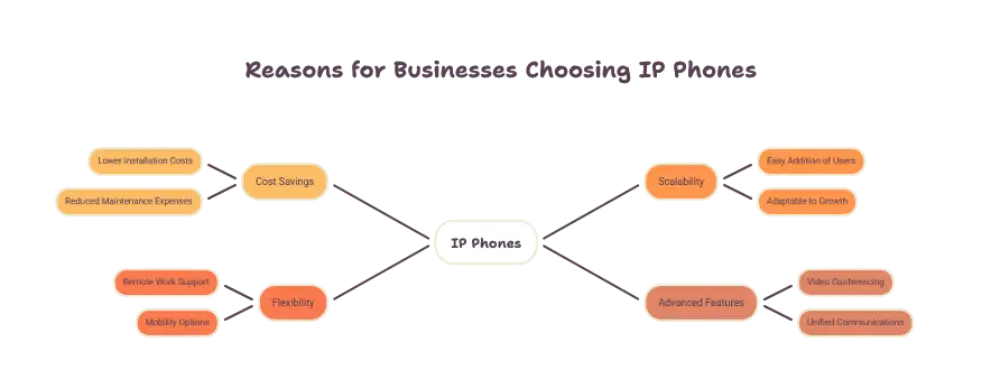
Modern teams need communication tools that keep up with the way they work. IP phones meet that need in several ways.
Better Voice Quality
Most IP phones support HD voice, also called wideband audio. Conversations sound natural, and background noise is reduced.
Clear audio means fewer repeated sentences and fewer misunderstandings. That matters for sales calls, customer support, and team meetings.
Flexibility and Scalability
Adding a new user is simple. You plug in a phone, connect it to the network, and assign an extension.
Teams can also work from anywhere. A phone set up at home can behave exactly like one at the office desk.
Rich Business Features
IP phones come with tools that once required expensive hardware. These include:
- Call transfer and call parking
- Conference calling
- Voicemail to email
- Call recording
- Do not disturb and call forwarding
These features help teams stay organized and respond faster.
Key Features That Define the Best IP Phones
Not every device is built the same. When you compare options, look closely at the features below.
HD Audio Quality
Sound quality is the heart of any phone. The best IP phones offer wideband audio on both the handset and the speakerphone.
Look for noise reduction and echo cancellation. These features keep calls clear even in busy offices.
Display and User Interface
A bright, easy to read screen makes daily use smoother. Color displays show caller details, contacts, and line status at a glance.
Programmable keys are also helpful. They let users set shortcuts for speed dial, transfers, and presence indicators.
Network and Power Options
Power over Ethernet, known as PoE, lets a phone draw power and data through one cable. It reduces desk clutter and simplifies installation.
Gigabit Ethernet ports are worth checking too. They keep calls stable, especially when a computer shares the same connection through the phone.
Security Features
Business calls often carry sensitive information. Strong IP phones support encrypted calling and secure provisioning.
Look for support for TLS and SRTP, which protect signaling and voice data. Regular firmware updates are also a sign of a well supported device.
Compatibility and Provisioning
The best IP phones work smoothly with popular VoIP platforms and SIP standards. This gives you freedom to change your setup later without replacing every device.
Zero touch provisioning is another big advantage. It lets an administrator configure many phones remotely, which saves time during rollouts.
Types of IP Phones to Consider
Different roles need different tools. Understanding the main categories helps you match the phone to the person.
Basic Desk Phones
These are ideal for staff who need simple, dependable calling. They usually offer a smaller screen, a few line keys, and the essential features.
They suit reception areas, shared spaces, and light users.
Executive and Advanced Desk Phones
These models add large color screens, more programmable keys, Bluetooth, and WiFi. They also support headsets and expansion modules.
They are a strong fit for managers, call center agents, and heavy phone users.
Conference Phones
Meeting rooms need audio that reaches everyone. Conference IP phones use powerful microphones and speakers to capture voices from all around the table.
Many also connect to laptops and mobile devices, which makes hybrid meetings easier.
Wireless IP Phones
Warehouses, hospitals, and retail floors need mobility. Wireless IP phones let staff move freely while staying reachable.
Look for strong battery life and a durable build when choosing this type.
Video IP Phones
Video models add a camera and a larger touchscreen. They bring face to face conversations to the desk without opening a separate app.
These are useful for remote teams and client facing roles.
How to Choose the Best IP Phones for Your Business
The right choice starts with understanding how your team actually works. A few simple questions can guide you.
Start with your users. Ask how often each person makes calls and what features they rely on. A receptionist needs different tools than a developer.
Next, check your network. Confirm that your switches support PoE and that your internet connection has enough bandwidth for voice traffic.
Then think about your VoIP platform. Make sure the phones you pick are fully compatible with your provider.
Finally, consider the environment. A noisy open office benefits from strong noise cancellation, while a quiet home office may not need it.
Common Mistakes to Avoid
Many businesses run into avoidable problems when buying IP phones. Here are the most common ones.
- Choosing one model for every employee, regardless of role
- Ignoring network readiness before installation
- Overlooking security features and firmware support
- Skipping a trial run with a small group first
- Forgetting about headset and accessory compatibility
A little planning up front prevents frustration later.
Tips for Getting the Most from Your IP Phones
Once your phones are in place, a few habits keep them performing well.
Keep firmware updated so you benefit from new features and security patches. Set up quality of service rules on your network to give voice traffic priority.
Train your team on the features they have. Many users never touch call transfer, voicemail to email, or shortcut keys simply because no one showed them.
Finally, review call quality now and then. Small issues are easier to fix when caught early.
Conclusion
The best IP phones combine clear audio, reliable connectivity, strong security, and features that match how your team works. There is no single perfect model for everyone.
Focus on your users, your network, and your VoIP platform. Match each phone type to the role it will serve.
With the right choice, your team gets smoother calls, better collaboration, and a communication system that grows with you.
Frequently Asked Questions
What are IP phones?
IP phones are devices that make calls over the internet instead of traditional phone lines. They connect through Ethernet or WiFi and support features like call forwarding, voicemail to email, and conferencing.
What makes the best IP phones different from regular phones?
The best IP phones offer HD audio, strong security, easy provisioning, and compatibility with modern VoIP platforms. Regular phones rely on older analog lines and offer far fewer features.
Do IP phones need special network equipment?
Not always, but a stable network helps. Many businesses use PoE switches to power the phones through a single cable, and a reliable internet connection keeps call quality consistent.
Can IP phones work for remote employees?
Yes. An IP phone can be set up at home and connect to the company system over the internet. It works like an office desk phone, with the same extension and features.
How do I know which IP phone is right for my team?
Start by looking at how each person uses the phone. Then check network readiness, VoIP platform compatibility, and needed features like Bluetooth, video, or wireless use.














Post Comment